Mastering Full Stack Web Development: A Comprehensive Guide

Vyyoma's Web Development Roadmap
Basics of Web Development
Frontend Development
Backend Development
Database
Basics of Web Development:
Start with HTML, CSS, and JavaScript to understand the fundamentals of building web pages and adding interactivity.
Frontend Development:
Dive deeper into frontend technologies like React.js, Angular, or Vue.js to create dynamic and responsive user interfaces.
Backend Development:
Learn server-side programming languages such as Node.js, Python (with Django or Flask), or Ruby on Rails to build the logic and functionality behind web applications.
Databases:
Explore database management systems like MySQL, PostgreSQL, or MongoDB to store and retrieve data efficiently.
Basics of Web Development
HTML :
HTML, or Hypertext Markup Language, is the standard language used to create and design web pages. It provides a structured means of organizing content on the internet, allowing developers to define the structure and layout of a webpage. Here’s a detailed description of HTML starting from basics:
1. Document Structure :
At the core of every HTML document is the `<!DOCTYPE html>` declaration, which tells the browser that the document is written in HTML5, the latest version of HTML. Following this declaration is the `<html>` element, which serves as the root element of the document. Inside the `<html>` element, you’ll find two main sections: the `<head>` and the `<body>`.

2. Head Section
The `<head>` section contains meta-information about the document, such as the title of the page, links to external resources (like CSS or JavaScript files), and metadata for search engines. It typically includes elements like `<title>`, `<meta>`, `<link>`, and `<script>`.

3. Body Section
The `<body>` section contains the actual content of the webpage that users see and interact with. It consists of various HTML elements that define the structure and layout of the page, including
- headings (`<h1>` to `<h6>`)
- paragraphs (`<p>`)
- lists (`<ul>`, `<ol>`, `<li>`)
- links (`<a>`)
- images (`<img>`) and more.
4. HTML Elements
HTML elements are the building blocks of a webpage. Each element consists of a start tag, content, and an end tag. Some elements, like `<img>` and `<br>`, are self-closing and don’t have an end tag. Elements can also have attributes that provide additional information about the element.

5. Semantic HTML
Semantic HTML refers to using HTML elements that convey meaning about the content they contain. This helps search engines understand the structure of the page and improves accessibility for users with disabilities. Examples of semantic elements include
- `<header>`
- `<nav>`
- `<main>`
- `<section>`
- `<article>`
- `<aside>`
- `<footer>`.
6. Comments
Comments in HTML are used to add notes or descriptions to the code, which are not displayed in the browser. They are enclosed within `<!–` and `–>` tags.

In summary, HTML is a fundamental markup language used to structure and organize content on the web. By understanding its basics and principles, developers can create well-structured and accessible web pages.
CSS :
CSS, or Cascading Style Sheets, is the styling language used to control the presentation and layout of HTML documents. Think of HTML as the structure or skeleton of a webpage, and CSS as the skin that beautifies it, defining colors, fonts, spacing, and more.
Here’s a breakdown of CSS from basics:
1. Selectors and Declarations
CSS works by selecting HTML elements and applying style declarations to them. Selectors target specific elements, classes, or IDs, while declarations define the style properties to be applied.

In this example, `h1` is the selector, and `color` and `font-size` are declarations with their respective values.
2. Properties and Values
CSS properties specify what aspects of an element to style, such as color, font, size, margin, padding, and more. Each property accepts specific values, which can be numerical, textual, or predefined keywords.

3. Selectors
CSS offers various types of selectors to target elements. Some common selectors include:
– Element selectors: Target HTML elements by their tag name (e.g., `p`, `h1`, `div`).
– Class selectors: Target elements with a specific class attribute (e.g., `.classname`).
– ID selectors: Target elements with a specific ID attribute (e.g., `#idname`).
– Descendant selectors: Target elements that are descendants of another element (e.g., `div p`).
– Pseudo-classes and pseudo-elements: Target elements based on their state or position in the document (e.g., `:hover`, `::before`).
4. Box Model
The CSS box model describes how elements are rendered on the page, including their content, padding, border, and margin. Understanding the box model is crucial for layout design and spacing control.
5. Inheritance and Specificity
CSS properties can be inherited from parent elements, meaning child elements can inherit styles unless overridden. Specificity determines which styles take precedence when conflicting rules are applied to the same element.
6. External, Internal, and Inline CSS
CSS can be applied to HTML documents in three ways:
– External: Using an external CSS file linked to the HTML document via the `<link>` element.
– Internal: Including CSS rules directly within the `<style>` element in the document’s `<head>` section.
– Inline: Applying styles directly to individual HTML elements using the `style` attribute.
7. Media Queries
Media queries allow CSS rules to be applied based on the characteristics of the device, such as screen size, resolution, and orientation. This enables responsive design, where layouts adapt to different screen sizes for optimal viewing on various devices.
JAVA SCRIPT :
JavaScript is a versatile programming language primarily used for creating interactive and dynamic content on web pages. Unlike HTML and CSS, which focus on structure and presentation, respectively, JavaScript adds behavior and interactivity to web applications.
1. Syntax and Structure
JavaScript syntax is similar to other programming languages like Java and C, making it relatively easy to learn for developers familiar with these languages. It’s a case-sensitive language, meaning `variable` and `Variable` are treated as different entities. JavaScript statements are typically terminated with a semicolon (;).
2.Variables and Data Types
JavaScript supports various data types, including numbers, strings, booleans, arrays, objects, and more. Variables are used to store data values, and they can be declared using the `var`, `let`, or `const` keywords.

3.Operators
JavaScript includes arithmetic, assignment, comparison, logical, and bitwise operators for performing operations on variables and values. Examples include
- `+` (addition)
- `-` (subtraction)
- `==` (equality)
- `&&` (logical AND)
- `|` (bitwise OR).
4. Control Structures
JavaScript provides control structures like `if` statements, `for` loops, `while` loops, and `switch` statements for controlling the flow of execution in a program. These structures enable developers to make decisions, iterate over data, and execute code conditionally.
5. Functions
Functions are reusable blocks of code that perform a specific task. They can accept input parameters and return output values. Functions are defined using the `function` keyword, and they can be invoked by their name.

6. Events and Event Handling
JavaScript enables developers to respond to user actions, such as clicks, key presses, and mouse movements, through events. Event handling involves attaching event listeners to HTML elements and specifying the actions to be taken when events occur.

7. DOM Manipulation
The Document Object Model (DOM) represents the structure of an HTML document as a hierarchical tree of objects. JavaScript can manipulate the DOM dynamically, allowing developers to add, remove, or modify HTML elements and attributes based on user interactions or other events.
8. Asynchronous Programming
JavaScript supports asynchronous programming through features like callbacks, promises, and async/await. Asynchronous operations allow tasks to execute independently of the main program flow, enabling non-blocking behavior and improving responsiveness in web applications.
Frontend Development
Introduction
What is React.js?
Setting Up Your Development Environment
Understanding Components
JSX (JavaScript XML)
State and Props
Handling Events
Lifecycle Methods
Hooks
Routing with React Router
State Management with Redux
Conclusion
Introduction
React.js has revolutionized the way modern web applications are built, offering a powerful and efficient way to create interactive user interfaces. Whether you’re a seasoned developer or just starting your journey into web development, understanding React.js is essential in today’s tech landscape. In this comprehensive guide, we’ll take you from the basics of React.js to advanced concepts, equipping you with the knowledge to build dynamic and scalable web applications.
What is React.js?
React.js, often referred to simply as React, is an open-source JavaScript library for building user interfaces. Developed by Facebook, React allows developers to create reusable UI components and manage their state efficiently. React follows a component-based architecture, where complex UIs are broken down into smaller, reusable components, making it easier to manage and maintain large-scale applications.
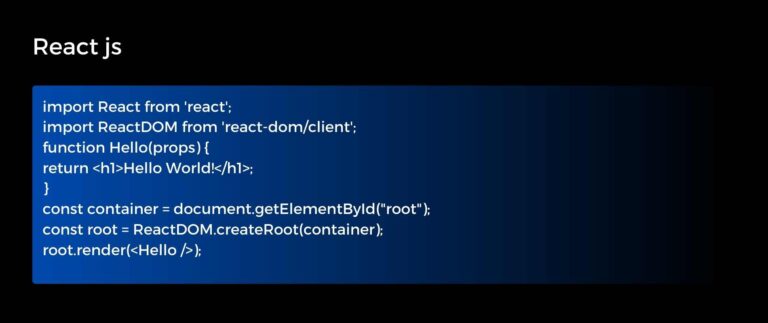
Hello world program in react js
Setting Up Your Development Environment
Before diving into React.js development, it’s essential to set up your development environment. You’ll need Node.js and npm (Node Package Manager) installed on your machine. Once installed, you can use npm to create a new React project using Create React App, a popular tool for bootstrapping React applications.

Understanding Components
At the core of React.js are components. Components are the building blocks of React applications, encapsulating HTML elements, styling, and behavior into reusable units. There are two types of components in React: functional components and class components. Functional components are JavaScript functions that return JSX (JavaScript XML), while class components are ES6 classes that extend React.Component.
Function Components
- Props
- State
- Lifecycle Methods (Hooks)
- Event Handling
- Conditional Rendering
- Lists and Keys
- Component Composition
Class Components
State
Lifecycle Methods
Props
Render Method
Handlers
Ref Handling
Component Composition
Context API
JSX (JavaScript XML)
JSX is a syntax extension for JavaScript that allows you to write HTML-like code within your JavaScript files. JSX makes it easier to define the structure of your UI components and is a fundamental part of React development. While JSX may look like HTML, it gets transformed into regular JavaScript function calls during compilation.
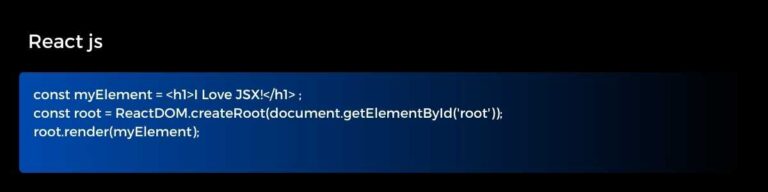
Simple JSX Code
State and Props
State and props are two important concepts in React.js for managing data and passing data between components. State represents the internal data of a component, while props (short for properties) are used to pass data from parent to child components. Understanding how to manage state and props effectively is crucial for building dynamic and interactive UIs in React.

Handling Events
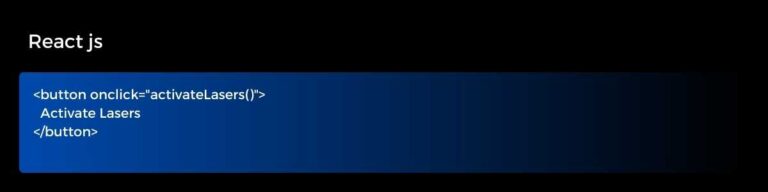
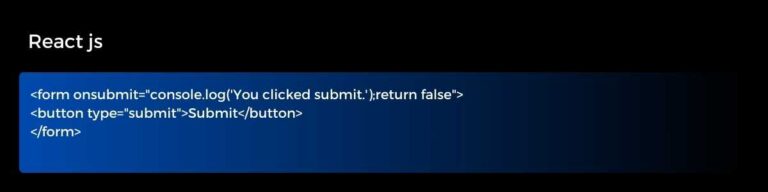
In React.js, you can handle user events such as onClick, onChange, and onSubmit using event handlers. Event handling in React follows a similar pattern to vanilla JavaScript, but with some syntactic differences due to JSX. By attaching event handlers to components, you can create interactive user experiences that respond to user actions.
Lifecycle Methods
Class components in React come with a set of lifecycle methods that allow you to hook into different stages of a component’s lifecycle. These methods include componentDidMount, componentDidUpdate, and componentWillUnmount, among others. Lifecycle methods are useful for performing tasks such as fetching data, updating the UI, and cleaning up resources.
Hooks
Introduced in React 16.8, hooks are a new addition to React that allows you to use state and other React features without writing class components. Hooks provide a more functional approach to managing state and side effects in React components. Some commonly used hooks include useState, useEffect, and useContext.
Routing with React Router
Single-page applications often require client-side routing to navigate between different views or pages. React Router is a popular library for handling routing in React applications. With React Router, you can define routes using Route components and navigate between them using links or programmatic navigation.
State Management with Redux
As React applications grow in complexity, managing state across multiple components can become challenging. Redux is a predictable state container for JavaScript applications that helps manage the application state in a more organized and centralized way. Redux works well with React and provides tools for managing state, actions, and reducers.
Conclusion
Many other options exist, such as vue and angular, but React.js has become the go-to choice for building modern web applications, thanks to its simplicity, flexibility, and performance. By mastering the fundamentals of React.js and delving into advanced concepts like state management and routing, you’ll be well-equipped to tackle any web development challenge.
Backend Development
In Backend development we learn about Node.js because in the fast-paced world of web development, Node.js has emerged as a game-changer, revolutionizing the way server-side applications are built and deployed. Let’s delve into the details of Node.js and explore how it’s reshaping the digital landscape.
Introduction to Node.js
Node.js is an open-source, cross-platform JavaScript runtime environment that allows developers to build scalable and high-performance applications. Unlike traditional server-side technologies, which rely on languages like PHP or Python, Node.js enables server-side programming using JavaScript, a language familiar to frontend developers.
Key Features of Node.js:
- Non-blocking I/O
- Event-Driven Architecture
- NPM (Node Package Manager)
- Single-threaded, Event Loop
- Cross-Platform Compatibility
Non-blocking I/O
One of the most significant advantages of Node.js is its non-blocking I/O model, which allows multiple I/O operations to be executed asynchronously. This enables Node.js applications to handle large numbers of concurrent connections without becoming blocked, resulting in improved performance and responsiveness.
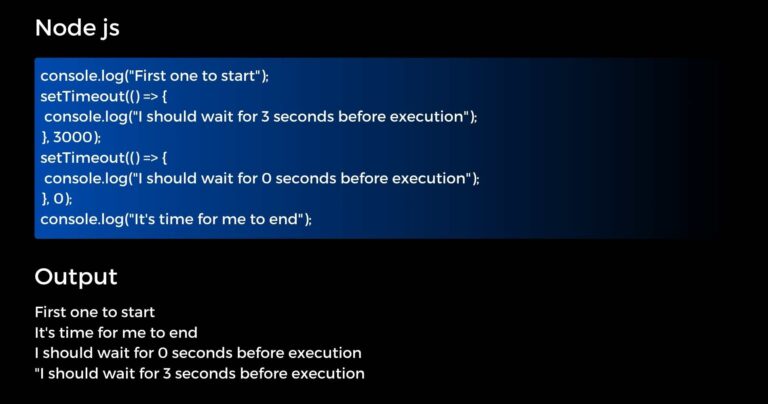
Non Blocking I/o
Event-Driven Architecture
Node.js follows an event-driven architecture, where callbacks are used to handle asynchronous operations. This allows developers to write code in a more modular and scalable manner, making it easier to manage complex workflows and handle asynchronous events effectively.
NPM (Node Package Manager)
Node.js comes with a powerful package manager called NPM, which provides access to a vast ecosystem of reusable libraries and modules. With NPM, developers can easily integrate third-party packages into their projects, saving time and effort in development.
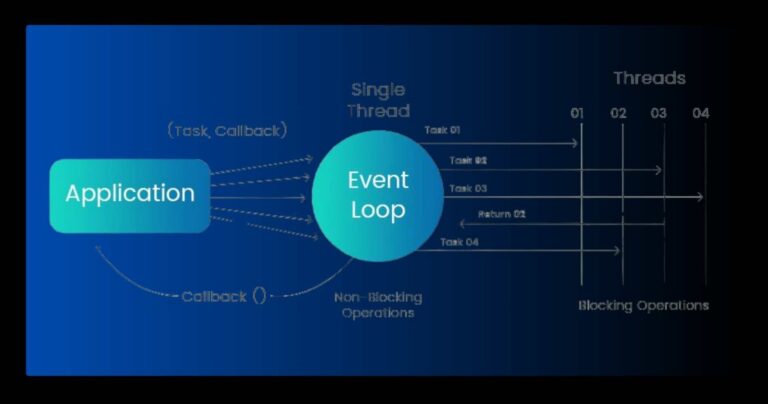
Single-threaded, Event Loop
Node.js operates on a single-threaded event loop, which efficiently manages incoming requests and delegates I/O operations to the system kernel. This lightweight architecture makes Node.js highly scalable and suitable for building real-time applications that require high concurrency.
Cross-Platform Compatibility
Node.js is designed to run on various operating systems, including Windows, macOS, and Linux, making it a versatile choice for developing applications across different platforms. Its cross-platform compatibility ensures that developers can write code once and run it anywhere.
Advantages of Node.js
- Faster Development
- Scalability and Performance
- Large Ecosystem
- Community Support
Faster Development
With its JavaScript-based syntax and extensive library of modules, Node.js enables rapid prototyping and development of server-side applications. Developers can leverage existing frontend skills to build full-stack applications, reducing development time and effort.
Scalability and Performance
Node.js’s non-blocking I/O model and event-driven architecture make it highly scalable and capable of handling thousands of concurrent connections with minimal resource consumption. This makes it ideal for building real-time applications, such as chat applications or streaming services.
Large Ecosystem
The Node.js ecosystem boasts a vast array of modules and libraries contributed by the open-source community, covering a wide range of functionalities, from web frameworks to database drivers. This rich ecosystem accelerates development and enables developers to focus on building innovative features rather than reinventing the wheel.
Community Support
Node.js has a vibrant and active community of developers who contribute to its ongoing development and maintenance. The community provides support, documentation, and resources to help developers overcome challenges and stay updated with the latest trends and best practices in Node.js development.
Conclusion
In backend we have other options like Python (with Django or Flask), or Ruby but Node.js has emerged as a powerful and versatile platform for building server-side applications, thanks to its non-blocking I/O, event-driven architecture, and extensive ecosystem. By leveraging the power of JavaScript on both the frontend and backend, developers can create scalable, high-performance applications that meet the demands of modern web development. Whether you’re building a simple API or a complex real-time application, Node.js empowers developers to innovate and deliver exceptional digital experiences.
Databases
MySQL is a popular choice for managing structured data due to its reliability, scalability, and ease of use. It is widely used in web applications, content management systems, and e-commerce platforms, powering some of the largest websites on the internet. MySQL is known for its robust performance, ACID compliance, and support for various programming languages, making it a versatile solution for storing and retrieving data.
Basics of MySQL
Installation and Setup
Begin your MySQL journey by installing the MySQL server on your system. You can choose from various installation methods, including downloading the MySQL Community Server from the official website or using package managers like apt or yum.
Creating Databases and Tables
Once MySQL is installed, you can start creating databases to organize your data. Use the CREATE DATABASE statement to create a new database, and then create tables within that database using the CREATE TABLE statement, specifying the columns and their data types.

Inserting and Retrieving Data
With your database and tables in place, you can begin inserting data using the INSERT INTO statement and retrieving data using the SELECT statement. Experiment with different SQL queries to filter, sort, and manipulate your data to meet your application’s requirements.

Intermediate MySQL Techniques
Query Optimization
As your database grows, optimizing your SQL queries becomes crucial for maintaining performance. Learn about indexing, query execution plans, and other optimization techniques to speed up your database operations and reduce latency.
Normalization and Database Design
Dive deeper into database design principles and learn about normalization techniques to eliminate data redundancy and maintain data integrity. Design efficient database schemas that support your application’s requirements and scale gracefully as your data grows.
.
Transactions and Concurrency Control
Understand the concepts of transactions and concurrency control to ensure data consistency and isolation in multi-user environments. Learn how to use transactions effectively to group SQL statements into atomic units of work and maintain database integrity.
Advanced MySQL Topics
Stored Procedures and Functions
Explore the power of stored procedures and user-defined functions to encapsulate business logic within the database layer. Write reusable code blocks that can be invoked from SQL queries or application code, improving code maintainability and performance.
Triggers and Events
Harness the capabilities of triggers and events to automate tasks and enforce data validation rules within the database. Create triggers that execute automatically in response to predefined database events, such as insertions, updates, or deletions.
Replication and High Availability
Learn about MySQL replication techniques to create redundant copies of your data and ensure high availability and fault tolerance. Set up master-slave replication or master-master replication configurations to distribute read and write operations across multiple database servers.
Conclusion
Some other alternatives in database are PostgreSQL, or MongoDB but by mastering MySQL, you’ll be equipped with the knowledge and skills to design, deploy, and maintain sophisticated database systems that drive the success of your web applications and businesses. So, dive into MySQL today and unlock the full potential of your data-driven projects.
